
Introduction
If you have ever spent twenty minutes crafting the perfect prompt to generate a brilliant piece of content, a complex piece of code, or a deep market analysis, you know the feeling of pure satisfaction when the AI finally returns the exact output you wanted. But what happens two weeks later when you need that exact same prompt again? If you are like most people, you end up scrolling endlessly through past AI chat logs, checking random sticky notes, or digging through messy document folders trying to find it.
This common frustration is precisely why modern creators and teams are turning to dedicated solutions. Promptosia was created to solve this modern digital challenge by giving users a clean, centralized workspace to save, refine, test, and share their best AI instructions. Instead of treating your most effective prompts as disposable messages that disappear down a chat window, this platform helps you turn them into reusable digital tools. Whether you are a solo freelancer looking to speed up your daily routine, a researcher organizing complex queries, or a growing business team trying to standardize your AI workflows, having a dedicated system to store and improve your prompts changes the way you interact with artificial intelligence.
What Is an AI Prompt Management Tool?
At its core, an AI prompt is simply the set of instructions, context, and guidelines you give to an artificial intelligence tool to get a specific response. When AI tools first became popular, most people wrote simple, one-line questions like “write an email” or “explain this concept.” However, as users became more experienced, they realized that better instructions yield vastly superior results. Today, high-quality prompts often include role descriptions, background context, strict rules, formatting choices, and example outputs.
Because these detailed instructions take time, thought, and effort to create, people naturally build up large collections of them. An AI prompt management tool is specialized software designed to help you save, arrange, and manage these instructions in a structured environment. Instead of relying on copy-and-pasting from chaotic text files, a prompt management workspace acts as a digital headquarters for your AI interactions. It allows you to store your tested instructions, adjust them whenever necessary, and quickly bring them into your daily work whenever you launch an AI conversation.
Why Building an AI Prompt Library Is Important
Imagine a software developer working without a code library, or a writer starting every single article without a outline template. Doing everything from scratch every time is inefficient and tiring. Without a dedicated system, valuable instructions get buried, forgotten, or overwritten. You end up wasting time re-inventing prompts you already perfected three weeks ago, leading to lower productivity and inconsistent results.
Building a structured AI prompt library solves this issue by creating a single source of truth for your best instructions. Storing your successful prompts in an organized repository gives you instant access to your proven formulas. When you know exactly where your top-performing prompts live, you can launch complex AI tasks in seconds rather than minutes. Over time, your library becomes a personalized knowledge base that grows more valuable as you refine your processes and discover what works best for your specific needs.
How Promptosia Works as a Prompt Engineering Platform
Prompt engineering is simply the practice of designing, refining, and structuring text inputs so that generative AI models produce the highest quality output possible. It is not just about writing a good sentence; it is about understanding how instructions, constraints, and examples guide the underlying model to produce accurate, reliable answers.
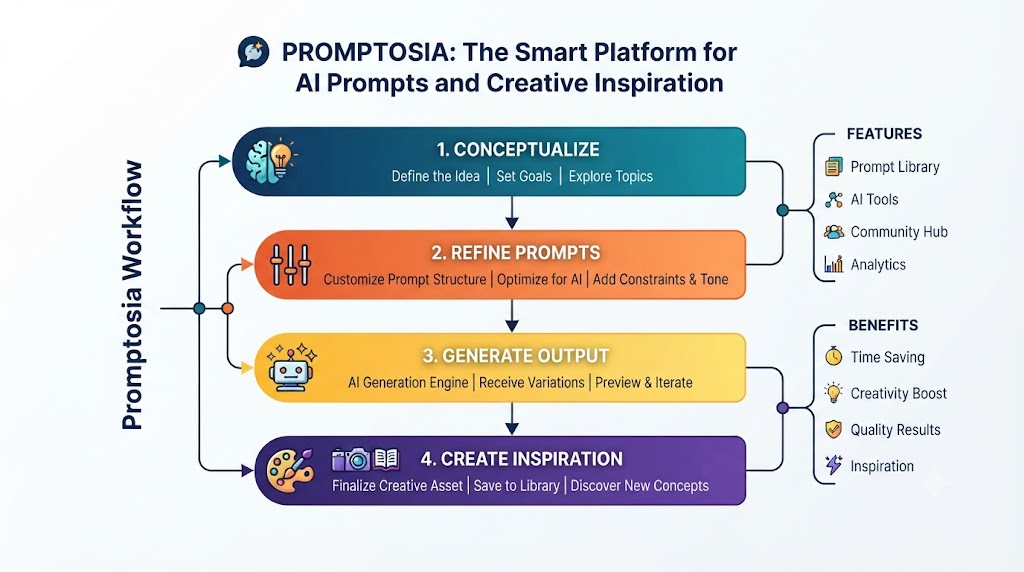
Promptosia functions as a complete prompt engineering platform by supporting your instructions through every step of their lifecycle. Rather than treating prompt engineering as a trial-and-error guessing game played in a chat window, the platform provides a structured environment where you can build, evaluate, and polish your ideas. From the initial spark of a new instruction to its final deployment in your team’s workflow, a dedicated platform ensures that your prompt engineering efforts are systematic, measurable, and repeatable.
Organizing Prompts With AI Prompt Organizer
When your collection of instructions grows from ten to hundreds, finding the right tool at the right moment becomes a challenge. Without a clear system, your workspace quickly becomes as cluttered as a desktop full of unnamed documents.
Using a dedicated AI prompt organizer allows you to structure your prompts into clear categories, custom folders, and searchable tags. You can organize your workspace by project type, client, platform, or department. Additionally, you can add dynamic variables—placeholders like [Topic], [Target Audience], or [Tone]—into your prompts. This allows you to transform a static piece of text into a flexible template that can be customized instantly before you run it. With robust search and tagging capabilities, finding the exact instruction you need takes only a couple of seconds.
Improving Instructions With AI Prompt Optimizer
Even experienced users often write prompts that are slightly vague, overly wordy, or missing essential constraints. A weak prompt often leads to generic, off-target, or unhelpful AI responses, forcing you to write multiple follow-up messages just to get what you wanted.
An AI prompt optimizer helps you refine basic instructions into clear, powerful, and precise prompts. It analyzes your raw text and suggests structural improvements, such as adding clear role definitions, setting output boundaries, specifying tone, or formatting guidelines. By turning simple ideas into fully articulated instructions, an optimizer ensures that the AI receives all the context it needs on the very first try, saving you from back-and-forth edits and yielding far more consistent outputs.
Understanding Prompts With AI Prompt Analyzer
To know why a prompt works well—or why it fails—you need to understand its internal structure. A long, complex prompt might contain conflicting instructions or ambiguous phrasing that confuses the AI model, leading to unpredictable answers.
An AI prompt analyzer breaks down your instructions to evaluate their core components. It reviews key elements like objective clarity, tone settings, variable usage, and expected output formatting. By analyzing these factors, the tool highlights blind spots, redundant phrasing, or missing context. This deep look into your prompt structure gives you actionable feedback on how to fix issues before you run the prompt, helping you build clearer and more effective instructions.
Checking Prompt Quality Before Use
In professional environments, using an untested or poorly written prompt can result in inaccurate reports, off-brand marketing copy, or buggy code snippets. Just as you proofread an important email before sending it, your prompts benefit from a quality check before being put to work.
A dedicated prompt quality checker evaluates your instructions against key performance standards, assessing clarity, structural logic, safety, and overall usability. It gives your prompt a clear quality score and offers practical tips for improvement. Checking prompt quality upfront helps you catch vague statements or missing rules early, giving you confidence that your instruction will generate high-quality, reliable outputs every single time.
Managing Prompt Improvements With Version Control
Prompts are rarely static; they evolve over time. As AI models update or your project needs shift, you will naturally tweak your instructions to improve performance. However, if you edit a prompt directly without saving past iterations, you risk losing a formula that previously worked well.
Using a prompt version control tool allows you to track every adjustment made to your instructions over time. Much like software developers track changes in code, version control logs your edits, updates, and draft iterations. If a new edit produces worse results than a previous version, you can review the history and revert to an earlier, proven draft with a single click. This historical log keeps your prompt library safe from accidental overwrites while encouraging creative experimentation.
Testing Different Prompt Results
Two prompts that look almost identical on paper can produce surprisingly different responses from an AI model. Changing a single sentence, altering the requested tone, or rearranging instructions can drastically alter the quality, depth, and style of the final output.
An AI prompt testing tool gives you a controlled space to test different variations of an instruction and compare their results side by side. By running multiple prompt versions against the same input variables, you can clearly see which phrasing produces the most accurate and creative response. This systematic testing approach removes guesswork, allowing you to select the winning prompt based on real, visible performance.
Reusing Successful Prompts With Templates
Once you have crafted, optimized, and tested a high-performing prompt, you shouldn’t have to rebuild it for future tasks. The real power of prompt management comes from turning your best instructions into flexible, reusable templates.
With reusable AI prompt templates, you can save core structures that feature customizable variable fields. For instance, a template for a blog post outline might include variables for [Primary Keyword], [Target Audience], and [Word Count]. Whenever you start a new project, you simply fill in those brief fields, and the tool builds the full, detailed prompt for you. This saves valuable time, eliminates repetitive typing, and ensures that everyone on your team follows the same high standard for AI tasks.
Promptosia Features Comparison Table
Here is a quick overview of how the core features within Promptosia support your daily AI tasks:
| Feature | What It Does | Benefit |
| AI Prompt Library | Stores useful prompts in one central place | Easy access, zero lost instructions, and quick reuse |
| Prompt Organizer | Categorizes prompts with tags, folders, and variables | Better workspace order and fast search results |
| Prompt Optimizer | Refines simple instructions into structured prompts | Clearer context, fewer follow-ups, and better responses |
| Prompt Analyzer | Reviews prompt structure, rules, and objectives | Finds hidden weaknesses and improvement areas |
| Quality Checker | Evaluates prompt effectiveness and scores usability | Ensures high performance before running queries |
| Version Control | Saves full edit history and past prompt iterations | Keeps successful versions safe from accidental loss |
| Prompt Testing | Compares outputs from different prompt variations | Helps you choose the best-performing instruction |
| Templates | Saves structured prompts with dynamic fields | Faster workflows and consistent output quality |
Who Can Use Promptosia?
Whether you work independently or as part of an enterprise team, structured prompt management helps simplify your daily AI interactions across various fields.
Content Creators
Writers, bloggers, social media managers, and video creators often rely on AI for brainstorming, outlining, drafting, and editing. By saving their best creative prompts, creators can quickly generate content that consistently matches their unique brand voice, style, and formatting requirements without starting from scratch every day.
Developers
Software engineers and web developers use AI for code generation, debugging, documentation, and refactoring. Storing technical prompts with clear language parameters, framework rules, and formatting requirements helps developers get precise, runnable code snippets while reducing time spent correcting syntax errors.
Marketers
Digital marketers manage campaigns across multiple channels, requiring prompts for ad copy, email sequences, SEO meta descriptions, and landing pages. Having a shared library of optimized marketing prompts allows marketing teams to maintain brand consistency, speed up campaign launches, and scale their messaging effortlessly.
Businesses and Teams
As companies adopt AI across departments, maintaining quality standards becomes critical. A centralized prompt platform lets teams store approved workflows, share best practices, and onboard new employees faster. Instead of every team member using different, unvetted prompts, the entire organization operates from a shared, high-performing library.
Students and Researchers
Academicians, students, and market researchers use AI to summarize dense papers, analyze datasets, generate research questions, and explain complex concepts. Organizing specialized research prompts helps them extract accurate insights, maintain academic rigor, and streamline their study or analytical workflows.
Benefits of Using Promptosia
Adopting a structured approach to prompt management offers clear advantages for everyday AI users:
- Saves Time: Eliminates time spent searching through old chat logs or rewriting past instructions.
- Keeps Prompts Organized: Uses clean folders, custom tags, and dynamic variables to keep your workspace clutter-free.
- Improves AI Output Quality: Helps you optimize and refine instructions to get accurate responses on the first try.
- Supports Teamwork: Makes it easy to share top-performing prompts and standardize workflows across groups.
- Makes Prompts Reusable: Turns one-off instructions into dynamic, customizable templates for recurring tasks.
- Reduces Repeated Work: Prevents you from having to recreate effective prompts from memory.
- Builds Better AI Workflows: Connects prompt creation, testing, and storage into a simple, reliable routine.
Common Problems Without Prompt Management
Without a clear system for managing your AI instructions, daily productivity can take a hit in subtle ways:
- Losing Valuable Prompts: You craft a prompt that yields amazing results, but a week later, it is lost in a sea of past chat histories.
- Recreating the Same Instructions: You spend extra time typing out similar rules and guidelines repeatedly for routine tasks.
- Not Tracking Improvements: You tweak a working prompt, only to realize the new version performs worse, with no way to restore the original version.
- Getting Inconsistent AI Results: Vague or incomplete prompts lead to unpredictable AI outputs, forcing you to waste time on back-and-forth edits.
- Difficulty Sharing with Teams: Team members use vastly different prompts for the same tasks, leading to inconsistent quality across projects.
Implementing a structured prompt management routine resolves these challenges by turning scattered, unpredictable instructions into an organized, efficient digital library.
Frequently Asked Questions (FAQs)
What is an AI prompt management tool?
An AI prompt management tool is software that helps users save, organize, refine, test, and share their AI instructions in one centralized location, making it easy to reuse effective prompts across different projects.
Why do users need an AI prompt library?
An AI prompt library prevents you from losing your best instructions down long chat logs. It gives you instant access to proven prompts, saves time, and ensures consistent quality in your AI-generated outputs.
How does Promptosia help organize prompts?
Promptosia allows users to arrange their instructions using clear categories, custom tags, dynamic variables, and searchable folders, turning a chaotic list of text files into a structured workspace.
What is a prompt engineering platform?
A prompt engineering platform is a workspace that supports the full lifecycle of a prompt. It provides tools for building, optimizing, analyzing, versioning, and testing instructions to get optimal results from AI models.
How does an AI prompt optimizer improve prompts?
An AI prompt optimizer reviews basic instructions and suggests improvements like clearer goals, role definitions, constraints, and structural formatting, helping you get better AI responses on the first attempt.
What does an AI prompt analyzer check?
An AI prompt analyzer evaluates factors like objective clarity, tone settings, variable placements, and output formatting to help you spot missing context or redundant phrasing in your instructions.
Why is prompt version control important?
Prompt version control tracks every edit made to an instruction over time. It saves your prompt history, allowing you to compare performance across drafts and revert to earlier versions whenever needed.
How do reusable AI prompt templates save time?
Reusable prompt templates use customizable fields for key variables. Instead of writing a full prompt from scratch, you simply fill in brief details to instantly generate a complete, structured instruction.
Final Thoughts: Building Better AI Workflows With Organized Prompts
As artificial intelligence becomes an integral part of daily work, the ability to communicate effectively with AI tools is becoming a key skill for creators, professionals, and teams alike. Simply having access to powerful AI models is no longer enough; the true advantage comes from how well you guide those models to deliver accurate, high-quality, and reliable results.
Good prompts are no longer just temporary chat entries—they are valuable digital assets that save time and elevate the quality of your work. By taking control of your AI instructions, organizing them into structured libraries, and refining them through systematic testing, you can transform disconnected tasks into smooth, repeatable routines. Platforms like Promptosia provide the structure and tools needed to manage, optimize, and share these assets efficiently, helping individuals and teams work smarter, move faster, and get the absolute best out of their AI workflows.